

Destinations
Destinations are the storage endpoints you can send events to (workspace ClickHouse, additional ClickHouse clusters, or object storage). Which destinations receive an event is determined by your pipeline: add one or more Destination steps so matching events are routed explicitly. Configure the destinations themselves under Destinations in the app; use Pipelines to choose where each topic’s events go.
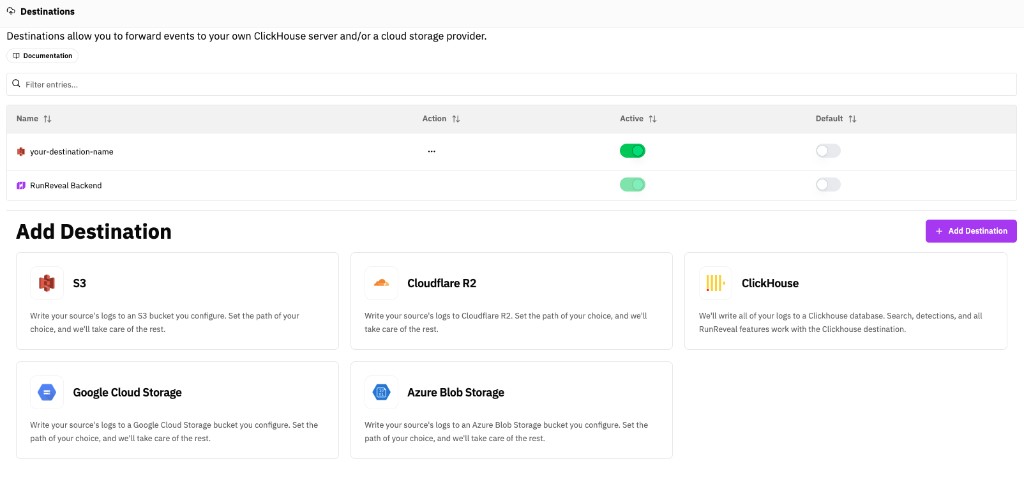
Default pipeline: New and migrated pipelines include a Destination step targeting RunReveal Backend (the workspace ClickHouse used for Explore and detections). Replace or add steps when you want object storage, an additional ClickHouse cluster, or S3-only routing.
Destination Types
ClickHouse
ClickHouse destinations store events in a ClickHouse database for real-time querying, analysis, and all RunReveal features. You can configure multiple ClickHouse destinations, with one marked as the default.
Use cases:
- Primary data storage for querying and analysis
- Custom ClickHouse instances for specific workflows
- Data replication across multiple databases
Object Storage (S3, R2, GCS, Azure)
Object storage destinations write events to cloud storage buckets for archival, backup, and long-term retention.
Supported providers:
- Amazon S3: Write logs to S3 buckets
- Cloudflare R2: Write logs to R2 buckets
- Google Cloud Storage: Write logs to GCS buckets
- Azure Blob Storage: Write logs to Azure storage containers
Use cases:
- Long-term archival of log data
- Backup and disaster recovery
- Compliance and retention requirements
- Cost-effective storage for historical data
Configuration
Destinations are configured in the RunReveal UI under Destinations. Each destination requires:
- Name: A unique identifier for the destination
- Type: ClickHouse or object storage provider
- Settings: Type-specific configuration (connection details, bucket names, paths, etc.)
- Credentials: Authentication information (stored securely)
ClickHouse Configuration
- Host: ClickHouse server address
- Port: ClickHouse server port
- Database: Target database name
- Credentials: Username and password, or SPIFFE/mTLS authentication
- Default destination: Mark as default (only one can be default)
SPIFFE/mTLS Authentication
For enhanced security, ClickHouse destinations can use SPIFFE-based mTLS authentication instead of username/password credentials. This enables certificate-based authentication with automatic certificate rotation.
Benefits:
- No password management required
- Automatic certificate rotation
- Stronger authentication through mutual TLS
- Integration with SPIFFE/SPIRE identity systems
To enable SPIFFE authentication for a destination:
- Toggle the Use SPIFFE Authentication option when creating or editing a ClickHouse destination
- Ensure the ClickHouse server is configured to accept certificate-based authentication
- The username field specifies which ClickHouse user to authenticate as (sent via the
X-ClickHouse-Userheader)
SPIFFE authentication requires server-side configuration. See the BYOC Deployment guide for details on configuring SPIFFE certificate paths.
Object Storage Configuration
- Provider: S3, R2, GCS, or Azure
- Bucket/Container: Storage bucket or container name
- Path: Optional prefix for where logs are written in the bucket/container
- Credentials: Provider-specific authentication (access keys, service accounts, etc.)
You can set different prefixes per destination. For example, one destination can write to logs/security/ and another to logs/archive/ so each route lands in its own path.
Destination pipeline step
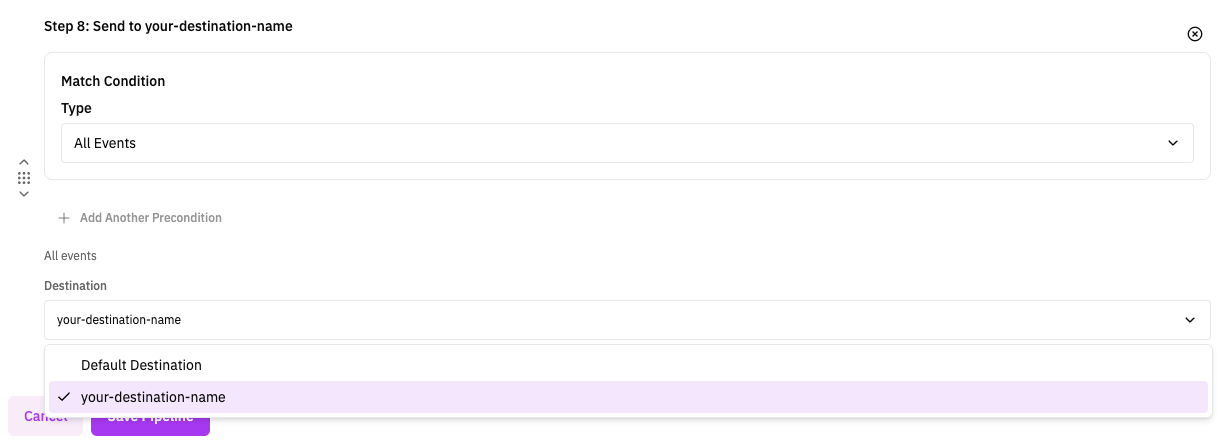
Use Destination steps when you need specific routing outcomes per event stream. For example, you can keep security-critical logs in RunReveal Backend for detections and investigations, while also writing a copy to object storage for long-term retention, compliance export, or lower-cost archival. Destination steps let you control this per topic and per precondition instead of treating all logs the same.
Pipelines control routing. Add a Destination step for each output you want; steps run in order, and multiple Destination steps can appear in the same pipeline to fan out the same event to more than one place (for example, workspace ClickHouse plus an S3 archive).
If you want "destination A for one subset, destination B for everything else," use step preconditions to split the flow:
- First Destination step: target destination A with a specific precondition.
- Next Destination step: target destination B with the opposite precondition (or another condition that captures the remaining events).
Destination steps do not stop pipeline execution. Later steps still run, so use preconditions intentionally to avoid sending the same event to both destinations unless that is what you want.
When you configure a Destination step, you select which destination ID to attach to the event:
- RunReveal Backend: the workspace’s primary ClickHouse database (multi-tenant or BYODB). This default target does not send to object storage by itself.
- Custom Destinations: any other destination you created (custom ClickHouse, S3, R2, GCS, Azure, etc.). To archive to S3, add a Destination step that selects that S3 destination’s ID.
To set per-event retention in days in ClickHouse (independent of which destination receives the data), add a Set TTL step in the same pipeline.
Health Checks
Destination health checks monitor whether RunReveal can successfully write events to a destination. When a destination accumulates write errors (for example because it is unreachable or misconfigured), RunReveal can alert your notification channels so you catch delivery problems early.
For source ingest monitoring (no logs received), see Source Health Checks.
When you configure a health check on a destination, RunReveal periodically counts write errors for that destination over the check interval. If the error count meets or exceeds your threshold for enough consecutive evaluations, RunReveal marks the check as alerting and notifies the channels you selected.
Adding a health check
Destination health checks are managed from the destination's Health Checks page (not on the destination create/edit form).
- Go to Destinations in the RunReveal app
- Open the row menu (
…) for the destination and choose Health Checks, or open the destination and select the Health Checks tab - Click Add Health Check
- Select Destination Write Errors
- Configure the settings below and save
Health check type
Today there is one destination health check type:
| Name | What it monitors |
|---|---|
| Destination Write Errors | Alerts when a destination accumulates write errors within the check interval, indicating the destination may be unreachable or misconfigured |
How evaluation works: RunReveal counts destination write errors over the previous check interval (the same window as the schedule). The check fails when errorCount >= threshold.
Configuration fields
- Display Name: Optional friendly name. If empty, the check type display name is used.
- Check Interval: How often the check runs; also the error-count window. Options include every 5 / 15 / 30 minutes, every hour, and every 6 / 12 / 24 hours. Default: every 15 minutes (
@15m). - Error Threshold: Alert when the destination has at least this many write errors in the check interval. Default: 5.
- Notification Channels: Where to send alerts when the check fails. If none are selected, the check still runs and tracks status.
- Consecutive Failures (Advanced): Consecutive failed evaluations before alerting. Default: 1.
- Throttle (min) (Advanced): Minutes between repeat alerts while still failing. Default: 30.
Status and results
| Status | Description |
|---|---|
| Normal | Passing: write errors are below the threshold |
| Pending | Failing, but consecutive failures have not reached the alerting threshold yet |
| Alerting | Failed enough consecutive times to trigger notifications |
On the destination Health Checks page you can review the checks table, open a check for charts and history (latest errors, average errors, healthy percentage, total checks), and silence, edit, or delete checks.
Related Documentation
- Pipelines - Topics, step order, and preconditions
- Set TTL - Retention step for ClickHouse
- Source Health Checks - Monitor log ingest volume
FAQ
Can I send the same event to more than one destination?
Yes. Add multiple Destination steps in the same pipeline. Each step appends a destination ID, so the event is routed to all selected outputs.
If I route to RunReveal Backend, does that also send to S3?
No. RunReveal Backend only targets ClickHouse storage. To send to S3, R2, GCS, or Azure, add a Destination step that selects that object storage destination.
If I configure a destination in the Destinations UI, do events go there automatically?
No. Creating a destination only makes it available for routing. Events are sent to a destination only when a pipeline includes a matching Destination step.
What happens if a pipeline has no Destination step?
For older pipelines, the router can still fall back to RunReveal Backend when no destination attributes are present. Use explicit Destination steps so routing is predictable.
Does one destination failure block all other destinations?
No. Routing attempts continue for other destinations, and errors are collected together. A failure in one destination does not stop delivery attempts to the rest.
Can I build an S3-only pipeline?
Yes. Add only the S3 destination step and do not include RunReveal Backend in that pipeline.
If I use a Destination step for another destination only, do events still go to RunReveal Backend?
No. If your pipeline only points to another destination, events only go there. They only go to RunReveal Backend if you add a Destination step for it, or in older fallback behavior when no destination attributes are set.